/ 01
The problem
There is more news than anyone can read, spread across sources of very different quality. Most news sites answer that with more: cluttered layouts, long articles, autoplaying everything. People who just want to know what happened today end up skimming headlines and missing the substance.
Our pitch was the opposite. One calm feed, sorted by topic, where every story fits in about sixty words. That's enough to know what happened, and short enough to read ten stories on a bus ride.
/ 02
Approach
With under a day to ship, we started from a generated React scaffold so the team could spend its time on data and behaviour rather than boilerplate. On day one I converted that scaffold from TypeScript to plain JSX (the language the whole team was fluent in), replaced its Supabase client with Firebase so sign-in matched what we already knew, and wired the home page to NewsAPI.
In parallel I built the piece the name promised: an Express service that sent each story's description to Google Gemini and asked for exactly sixty words back. Abhijit built sign-in, the profile page and bookmarks on top of the same data, so the two halves met in the news card.
By the final hours the summariser still wasn't connected to the feed, so we shipped the reader without it and removed the backend rather than leave a half-working feature in the product.
/ 03
What I built
Category chips
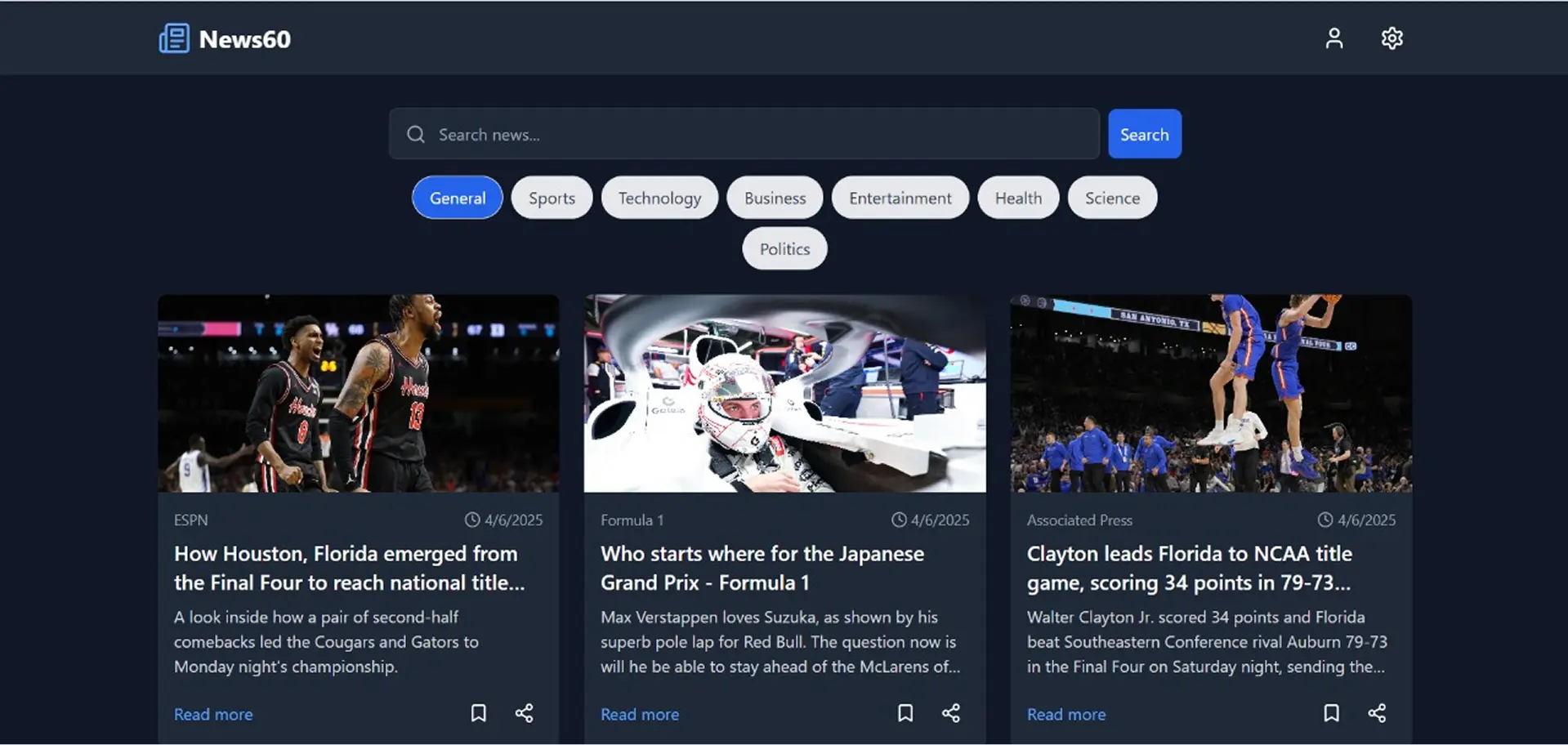
Eight pill buttons switch the feed between NewsAPI's top-headline categories (general, sports, technology, business and more) without a page load.
Keyword search
A search box swaps the feed to NewsAPI's full archive endpoint, sorted by popularity, so you can follow a story beyond today's headlines.
Readable cards
A one-, two- or three-column grid of cards with image, source, date, a clamped headline and summary, plus a fallback image when a publisher's photo fails to load.
Bookmarks
Save any story and find it later on your profile, with a 'saved 5 minutes ago' timestamp. Saved items are de-duplicated by URL and kept in the browser.
Sign-in three ways
Email and password with real validation (strong-password rules, matching confirmation), or one tap with Google or GitHub through Firebase Auth.
Native share
On phones the share button opens the system share sheet, so a story goes straight to WhatsApp or Messages instead of a copy-paste.
/ 04
How it works
- Interface
- React 18 + Vite
- React Router
- Tailwind CSS
- zod forms
- Data
- NewsAPI · top headlines
- NewsAPI · search
- localStorage bookmarks
- Identity
- Firebase Auth
- Email & password
- GitHub
- Prototype (cut)
- Express API
- Gemini 2.0 Flash
- 60-word rewrite
/ 05
Hard parts
- 1
Making a batch of AI calls fail gracefully
Summarising a page of stories means one model call per story, and any one of them can time out. I sent them in parallel with Promise.allSettled and returned a result or an error per story, so one slow article would never blank the whole feed.
const results = await Promise.allSettled( newsArray.map((news) => aiService(news)) ); res.json(results.map((r, i) => r.status === "fulfilled" ? { news: newsArray[i], response: r.value } : { news: newsArray[i], error: r.reason.message } )); - 2
Knowing when to cut a feature
The summariser was the headline idea, but our inputs were NewsAPI's one-line descriptions, not full articles, so the model was being asked to stretch a sentence to sixty words rather than condense a story. With the clock running out we shipped the reader without it rather than ship text that added nothing. The honest fix is to summarise the article body, and that needs a server-side fetch we didn't have time to build.
- 3
Porting a generated scaffold under time pressure
The starter came in TypeScript with a Supabase back end. Converting every component, hook and config to JSX and swapping in Firebase on the first morning meant the rest of the team never had to fight unfamiliar tooling. The cost was a few leftover dependencies we never had time to prune.
/ 06
Design
The interface stays out of the way of the news: a sticky white header with the News60 wordmark, a centred search bar with rounded topic chips underneath, and a generous card grid on a soft grey page. Blue is used for one thing only: what you can act on.
Headlines are clamped to two lines and summaries to three, so every card has the same rhythm and the grid never turns ragged. Cards lift slightly on hover, actions have accessible labels, and the layout steps from one column on phones to three on desktop.
- Action blue#2563EB
- Ink#111827
- Secondary text#6B7280
- Page#F9FAFB
- Card#FFFFFF
/ 07
Outcome
- Shipped a working news reader with categories, search, bookmarks, three sign-in methods and native share in about 21 hours, as a team of three.
- Prototyped an AI summarisation service end to end (Express → Gemini, with per-story error handling) and made a deliberate call not to ship it.
- Not yet built: offline reading, preference-based feeds and the 60-word summaries in the live feed. The README lists them as next steps.
/ 08
What I learned
- Summarise the source, not the teaser. An AI feature is only as good as its input. Ask a model to stretch a one-line description to sixty words and you get padding.
- API keys belong on a server. Calling NewsAPI from the browser was fast to build but exposes the key and runs into the provider's browser restrictions in production. A small serverless proxy fixes both.
- Generated scaffolds buy speed on day one and cost cleanup on day two. Next time I'd budget an hour to remove what the template brought with it.